
Capture notes and files without a connection
This feature is in early access: it is built and tested, but not yet switched on for every organisation or not yet tried with the outside provider. Ask us on WhatsApp if you would like to try it.
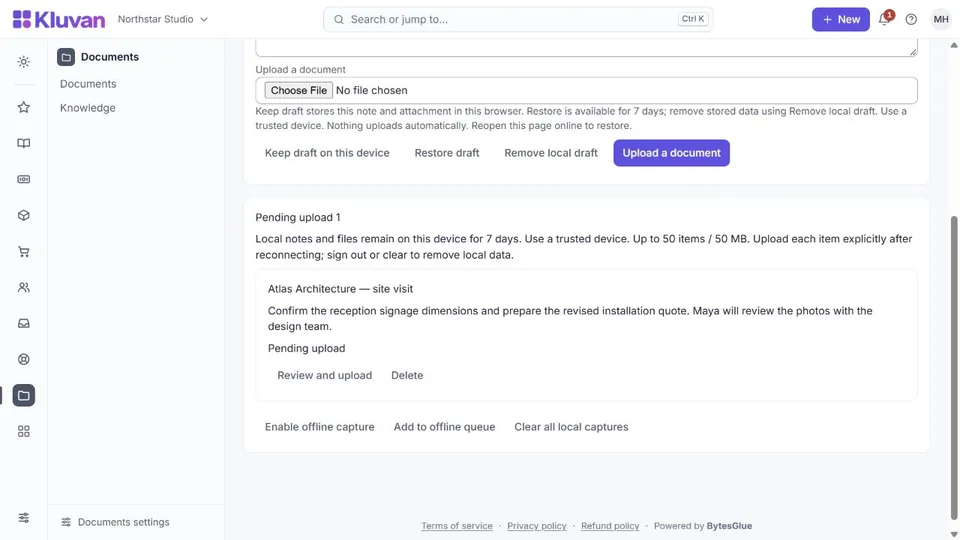
While online, open Capture (/capture) and opt into offline storage on this device. Then open the offline workspace (/offline) once so its static shell is ready. Use a private, trusted device: queued material is stored in the browser.
- Give the capture a title, add notes and optionally an image or PDF, then save it to the local queue.
- Without a connection, reopen the prepared offline workspace to add or inspect queued captures. A cold reload is supported after setup.
- When online again, sign in to the same organisation and user account. Choose upload explicitly; queued work is not silently sent.
- Check that the item reached Documents before removing your local copy. If an upload fails, it stays queued for retry. Retries retain the same identity to avoid duplicate documents.
The queue allows 50 items and 50 MB in total, with at most 20 MB per file. Items expire after seven days. Logging out clears local captures; upload needed work first. Browser storage clearing, private browsing or device loss can remove unsent work, so it is not a backup.
The offline shell does not cache authenticated pages or business records. Accounting, payments, approvals and access to live business records require an online connection. Existing field-work pending items are shown separately and remain tied to their original organisation and user.
No AI request is needed for offline capture. Uploading a file into Documents does not automatically extract a bill or post accounting entries; use the appropriate reviewed workflow after reconnecting.
Was this page helpful?
Thank you. Your answer helps us improve this page.
Still need help?
Chat with us on WhatsApp. Tell us what you were doing and, for an error, the code after the # in the link.