
Product data transfers
Open Settings → Bring your data → Product data transfers. You must own both workspaces or work with their owners. Both products need the current transfer release. Start with a small sample and check the destination receipt before transferring more.
/settings/product-transfer
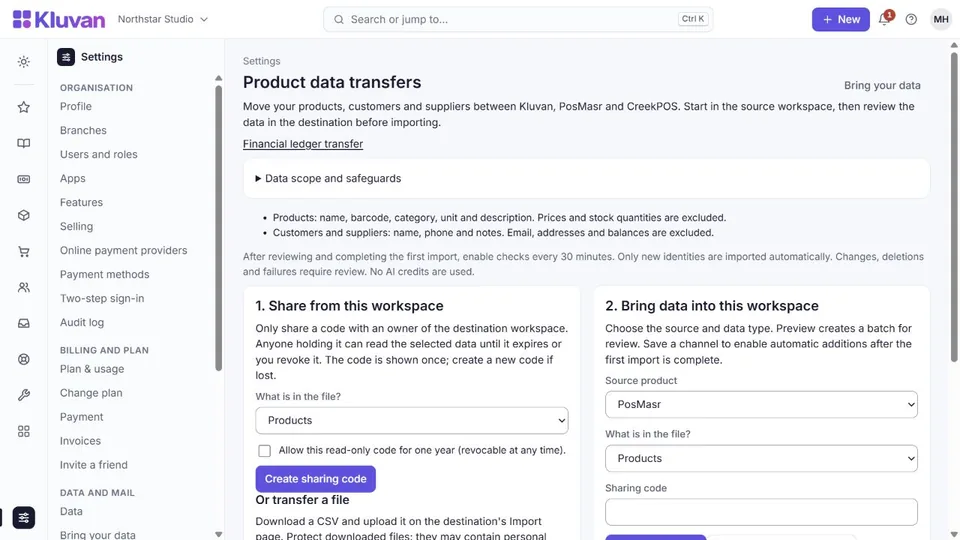
1. Share from this workspace
Only share a code with an owner of the destination workspace. Anyone holding it can read the selected data until it expires or you revoke it. The code is shown once; create a new code if lost.
A code lasts 24 hours. For a saved channel, tick Make it a code for a saved channel before you create it: the code is then valid for one year, and the page shows that date first. The list under Sharing access shows each code's kind and expiry, and the destination's saved channel shows the date its source reported. You can revoke any code at any time.
Create sharing code
2. Bring data into this workspace
Choose the source and data type. Preview creates a batch for review. Save a channel to enable automatic additions after the first import is complete.
Products: name, barcode, category, unit and description. Prices and stock quantities are excluded.
Customers and suppliers: name, phone and notes. Email, addresses and balances are excluded.
Saved data channel
After reviewing and completing the first import, enable checks every 30 minutes. Only new identities are imported automatically. Changes, deletions and failures require review. No AI credits are used.
Saved channels require a unique barcode on every product or a unique phone number on every contact. If these are missing or duplicated, use a one-time preview or CSV and check name matches carefully. An export is limited to 10,000 source rows and a bounded file size. Prices are excluded: set or check prices in the destination before selling newly imported products. Changed identifiers can create new matches; always review the batch.
Or transfer a file
Download a CSV and upload it on the destination's Import page. Protect downloaded files: they may contain personal information.
Sharing access
Revoking stops future reads. It does not erase files already downloaded or records already imported into another workspace.
These transfers use no AI credits. They do not move sales, invoices, balances, stock quantities, staff accounts or credentials. Existing records and deletions are never applied automatically. For financial history, use the separate accounting migration workflow.
Financial ledger transfer
/settings/financial-transfer
Same-currency accounting migration and consolidation. Balanced journal entries and linked customer/supplier balances move to the main branch. Source invoices, bills, attachments, stock and tax filings are not recreated. Transfer contacts first. Review accounts and reconcile balances before posting; existing business activity can overlap. No AI credits are used.
The read-only code covers posted journals from the selected month onward, including linked party balances. Review each page of up to 25 entries. Revocation stops future reads.
Ledger codes follow the same rule: 24 hours, or one year for a saved channel when you tick it.
I reviewed the accounts, destination balance impact and source scope, and approve these postings.
Save an encrypted channel. Every 5 minutes it processes up to 25 entries, cycling from the selected month through the current month to catch late postings. New entries use the reviewed account mappings; changes or missing mappings require review.
If all valid rows already exist, enabling automatic checks confirms an unchanged review without overwriting local records. Background checks also complete unchanged batches, so later additions can continue.
Was this page helpful?
Thank you. Your answer helps us improve this page.
Still need help?
Chat with us on WhatsApp. Tell us what you were doing and, for an error, the code after the # in the link.